Fallgatter.info

Jan Fallgatter · independently developed in Zittau

Software from everyday practice. Work locally. Discover more.

Tools for files, search and 3D, developed to meet everyday needs. Alongside them, practical notes on working with local software and AI.

Try Gatterie for free: 14-day trial, no registration.

100% local Your files stay on your Mac.
No subscription Nothing is billed monthly.
No account No sign-in, no server.
Apple Silicon Built for Macs with M-series chips.

The apps

One gallery for everything on your Mac — and tools around it.

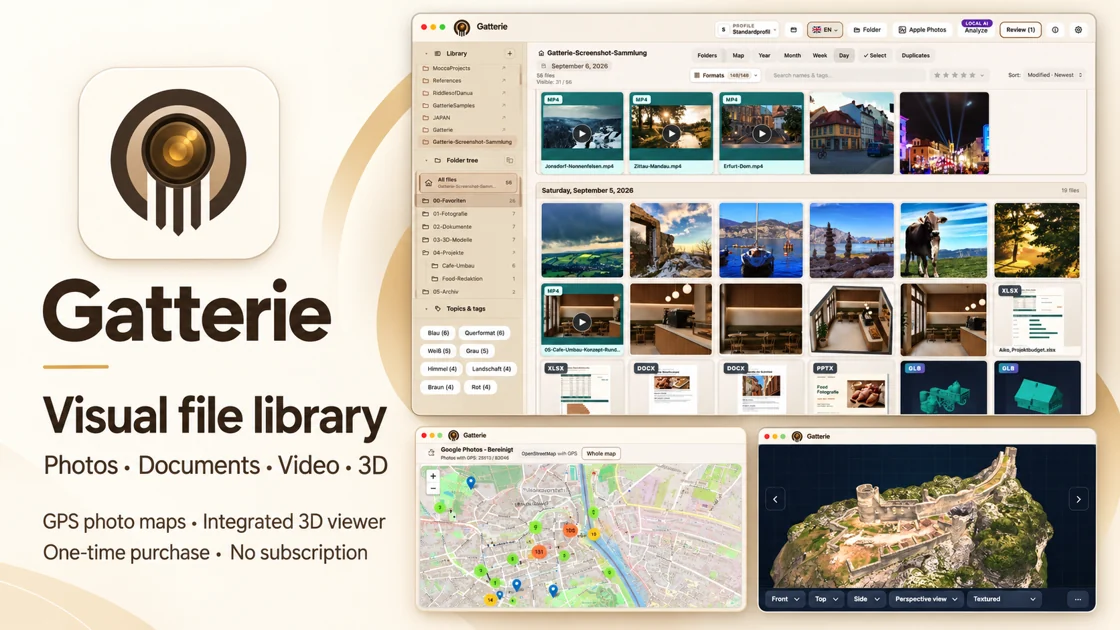
Gatterie presents photos, documents, 3D and CAD files in one gallery

Photos, documents, 3D & CAD — visible together without giving up your folder structure.

Gatterie app icon
GatterieOn the Mac App Store

The Picasa alternative for Mac

Visual file library with GPS photo maps and a 3D viewer.

Your folders stay as they are. Gatterie shows photos, RAW, videos, PDFs and 3D models as a gallery or timeline — searchable, offline and without import.

  • Previews for over 140 formats
  • Timeline, tags & stars
  • 3D viewer for STL, OBJ, FBX, GLB
  • Built-in image editor
  • Photos on a map
  • Optional local AI
€29.99 introductory price One-time purchase, no subscription macOS · iPhone & iPad (beta)
Discover Gatterie
Taskabar app icon
TaskabarFree

A taskbar for the Mac.

Dock icons show an app’s windows — one click switches straight to them. The Dock stays; it simply gains the behaviour of a taskbar.

View Taskabar
moccaSearch app icon
moccaSearchMac beta · awaiting Apple approval

Filed away somewhere. Found again here.

A local full-text search for Mac: moccaSearch searches files and the contents of supported documents in your selected folders, with previews right beside the results. Your search index stays on your Mac.

View moccaSearch
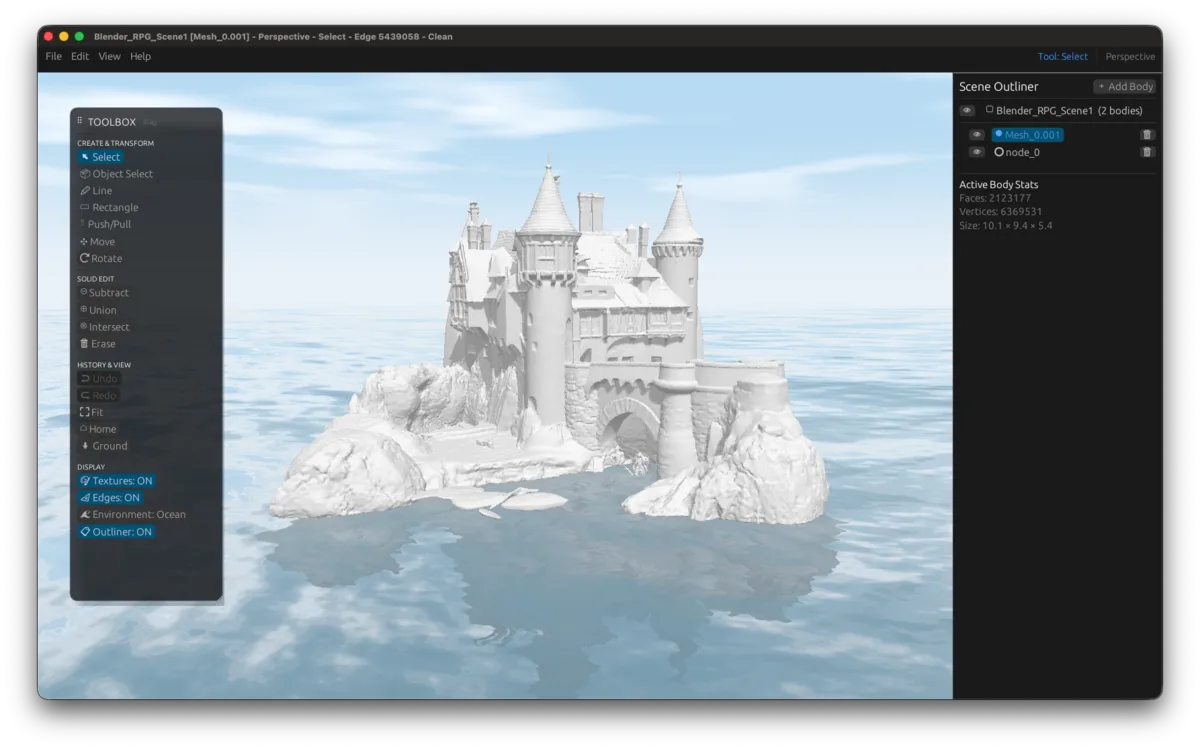
Mocca Studio showing a detailed castle model in the Ocean environment
Mocca Studio app icon
Mocca StudioIn development

3D modeling and CAD viewer.

Direct modeling meets a powerful 3D viewer: sketching, Push/Pull and B-Rep operations come together with large models, many exchange formats and freely explorable scenes.

View Mocca Studio

Which app for what

Photo organizer, taskbar, file search, 3D — each app one job.

Comparison of the apps: purpose, status, platform and price.
Purpose Gatterie Taskabar moccaSearch Mocca Studio
What it does Browse and rediscover large collections of photos, documents and 3D models. Dock icons that behave like a taskbar: see your windows and switch directly. Search files and the contents of supported documents in selected folders. Direct modeling and a 3D viewer for CAD models and large scenes.
Status On the Mac App Store Released, version 0.82 Beta, awaiting Apple's approval In development
Platform macOS, iPhone & iPad macOS macOS macOS
Price €29.99 introductory price at launch — one-time purchase, no subscription free not decided yet not decided yet

Gatterie is not a cloud gallery. It uploads nothing and does not create a second library. Your folders remain the source of truth — Gatterie merely presents them.

Taskabar does not replace the Dock. It extends it. The familiar dock stays where it is; the icons additionally gain the behaviour of a taskbar.

moccaSearch only searches the folders you select. No access to the whole machine. The search index stays on your Mac.

Mocca Studio is not a replacement for engineering software. It is a tool for viewing, sketching and quick changes — not for producing full technical drawings.

Who is behind this

Independently built in Zittau — because I missed exactly these tools myself.

fallgatter.info is where the projects of Jan Fallgatter from Zittau in Lusatia, Germany live. The apps are built alongside a day job, for a simple reason: I could not find the way of working they enable anywhere on the Mac.

The trigger was always the same: local, without an account, without a subscription. I wanted tools that work with my own files and folders exactly as they sit on the disk — nothing uploaded, nothing migrated, nothing paid monthly. When I could not find any, I started building them for myself. Later came the thought: why not make them available to others too?

That is how independent projects came about: Gatterie makes large collections of photos, documents and 3D models visible and searchable. Taskabar brings the taskbar to the Mac. moccaSearch finds files and the contents of supported documents. Mocca Studio combines direct modeling with a 3D viewer and is still in development. Gatterie, moccaSearch and Mocca Studio are written in Rust, Taskabar in Swift. For now only the Mac and iOS versions are released and supported — but the project is not tied to them: a Windows build of Gatterie already runs. What they all share is the same stance: your data stays on the machine where it already is.

📍 Zittau, Lusatia, Germany 🦀 Rust & Swift Some threads lead elsewhere …

Questions, comments or support: jan@fallgatter.info — I reply myself.

Frequent questions

Price, privacy and system requirements.

How much do the apps cost?

Gatterie costs €29.99 as an introductory price at launch — one-time purchase, no subscription. Taskabar is free.

Is there a subscription?

No, not for any of the apps. Nothing is billed monthly — that was the starting point of the whole project.

Is my data uploaded to the cloud?

No. All apps work with your files where they are. There is no account, no sign-in and no transfer of your files to a server. What is on your Mac stays on your Mac.

What happens to my files?

Gatterie doesn’t move, rename or delete your files. No import, no catalog: it shows existing folders. By default, edited images are saved as a new copy; only an explicitly selected expert option can change the original, after a warning. Removing the app changes nothing in your folders.

Which Mac do I need?

A Mac with Apple Silicon. Intel Macs are not supported. The exact system requirements are listed on each product page.

Does it run on Windows?

For now, only the Mac and iOS versions are released and supported — the project is still young and should not span too many platforms at once. Technically, Windows is already possible: Gatterie already runs there. There is no date for an official Windows release.

How do I get the apps?

Gatterie is available on the Mac App Store. Taskabar is a direct download from its product page. Each project page lists current availability and information about test versions.

Who develops the apps?

One person: Jan Fallgatter from Zittau in Lusatia, Germany. No team, no company. If you have questions, I answer them myself — jan@fallgatter.info.