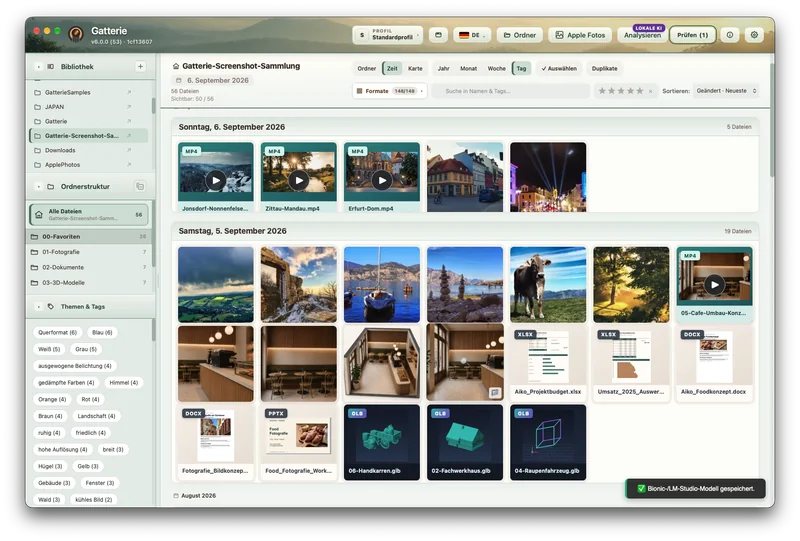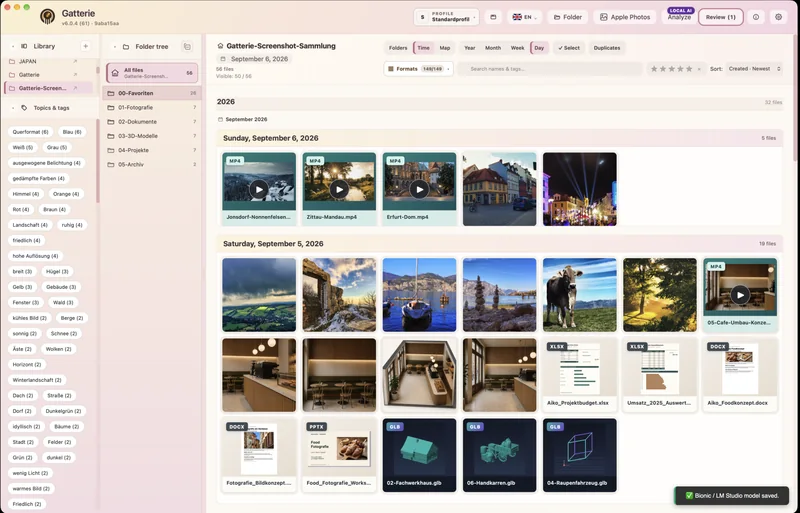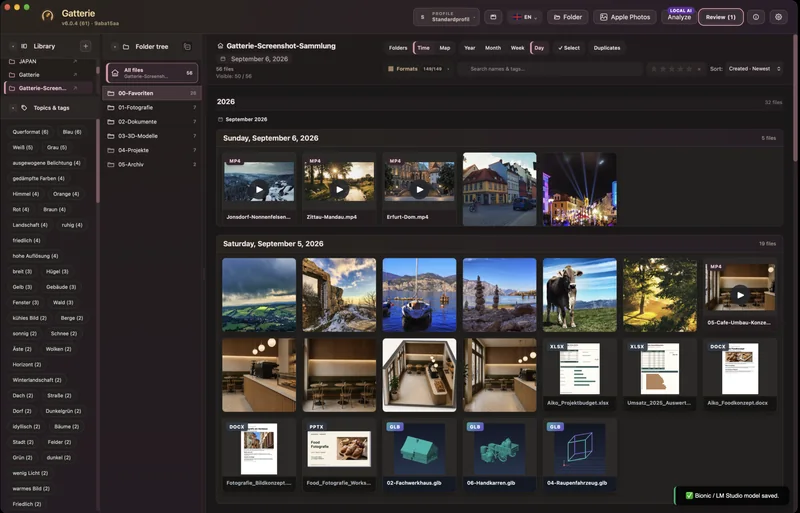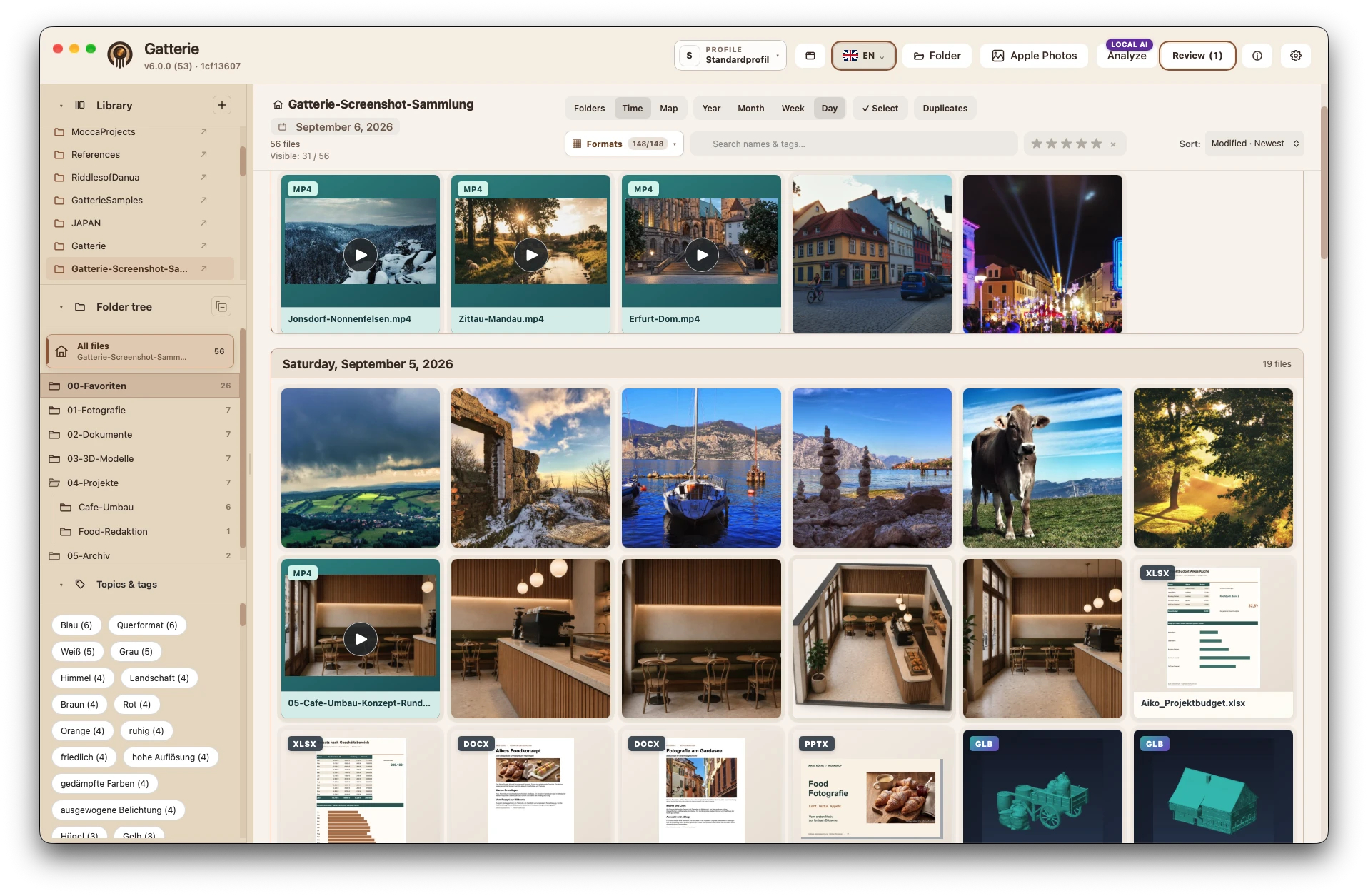


Your folders stay – no import.
No new media library, no migration: Gatterie works directly with your existing folder structure.
 GatterieVisual File Library
Gatterie is a visual file library for Mac – a Picasa alternative with no import. Photos, videos, music, documents and 3D models open right in your existing folders. Gatterie doesn't move, rename or delete your files.
One-time purchase · No subscription · Family Sharing · Requires a Mac with Apple silicon (macOS 12+)Trial details ↓
NEW IN GATTERIE 6.1
Gatterie now plays music from your folders – with visualizers that react to beat and sound, a title list of its own and a graphic equalizer. And the large view now wears your theme.

MP3, M4A, AAC, WAV, AIFF and FLAC open right in the large view. Gatterie draws moving images to go with them – from Bars and Ring to Kaleidoscope and Fractal, Nebula and Bloom. In Auto mode they change in step with the music.
The info panel, bars and buttons match the chosen theme. The area around the photo stays neutral so colours stay true.
See what comes next, move titles or take them out. Gatterie remembers the list for each library – your files stay unchanged.
SoundSliders and presets such as Rock, Jazz, Classical or Bass boost. The equalizer only affects playback, not your files.
See everything new in 6.1 →
Black marble with gold veins. Dark themes turn the whole interface dark, including dialogs, menus and the gallery.
Light gradients in cream, vanilla and pink – and the dark counterpart in vanilla, rose and plum.
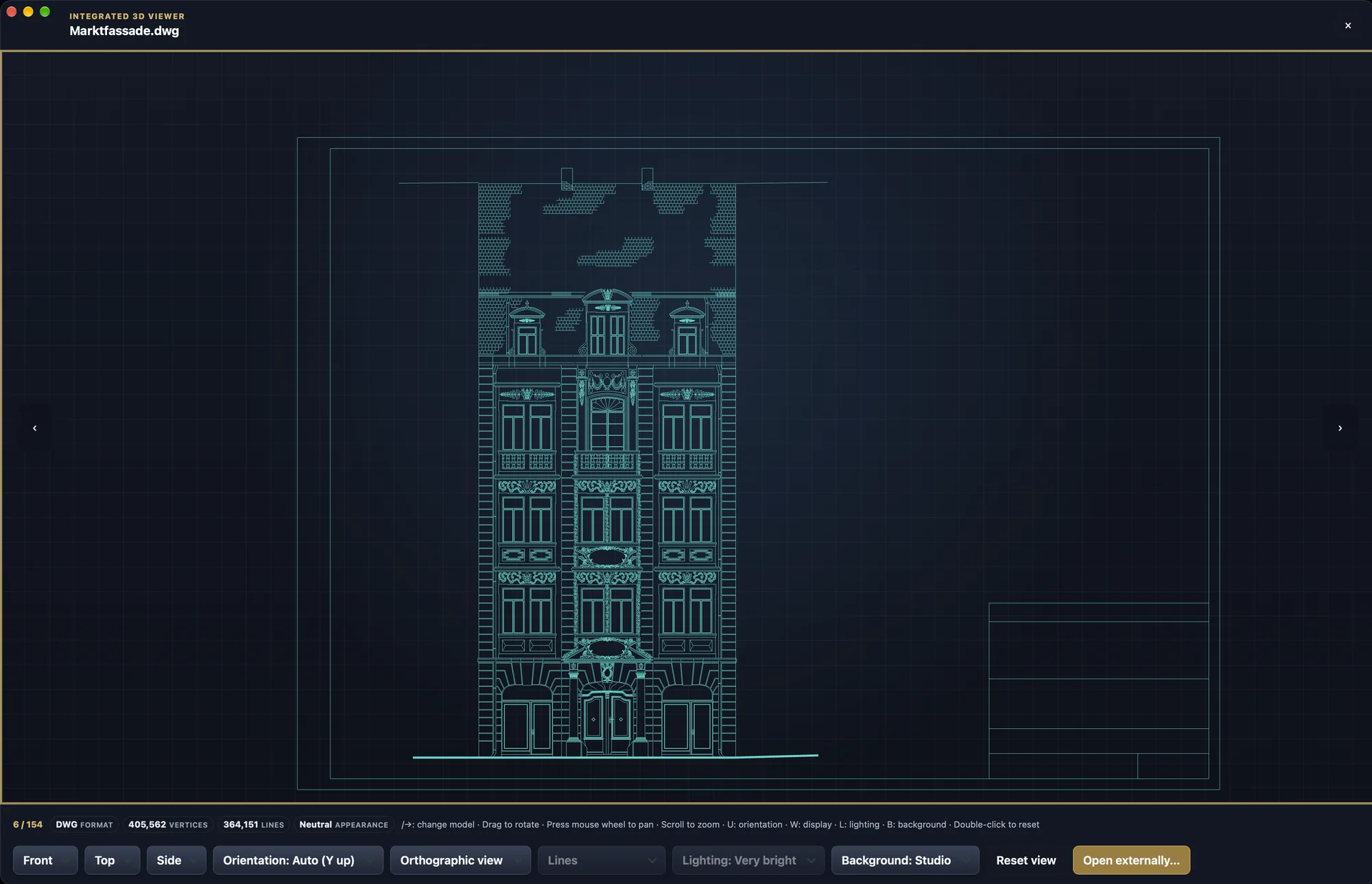
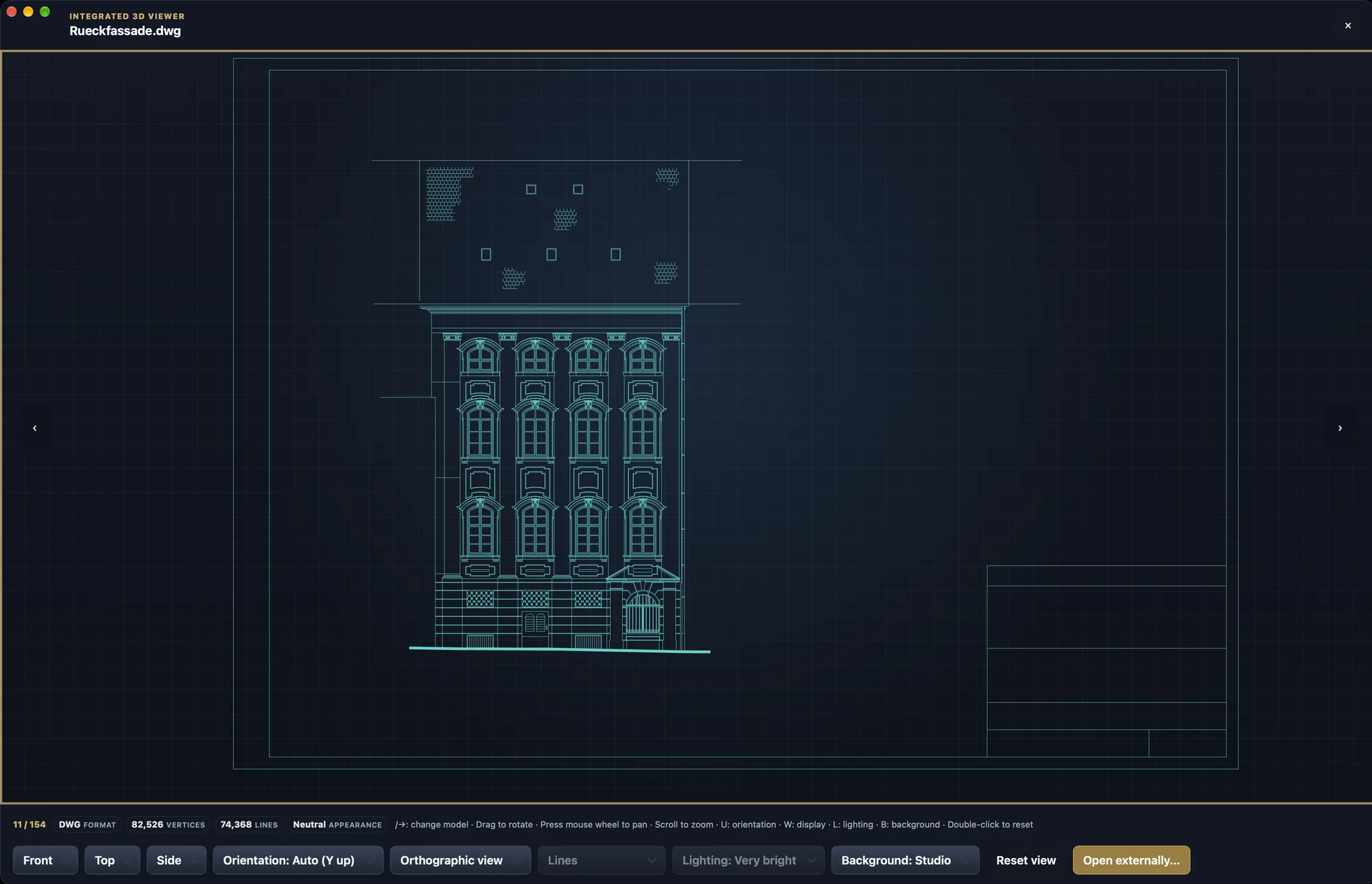
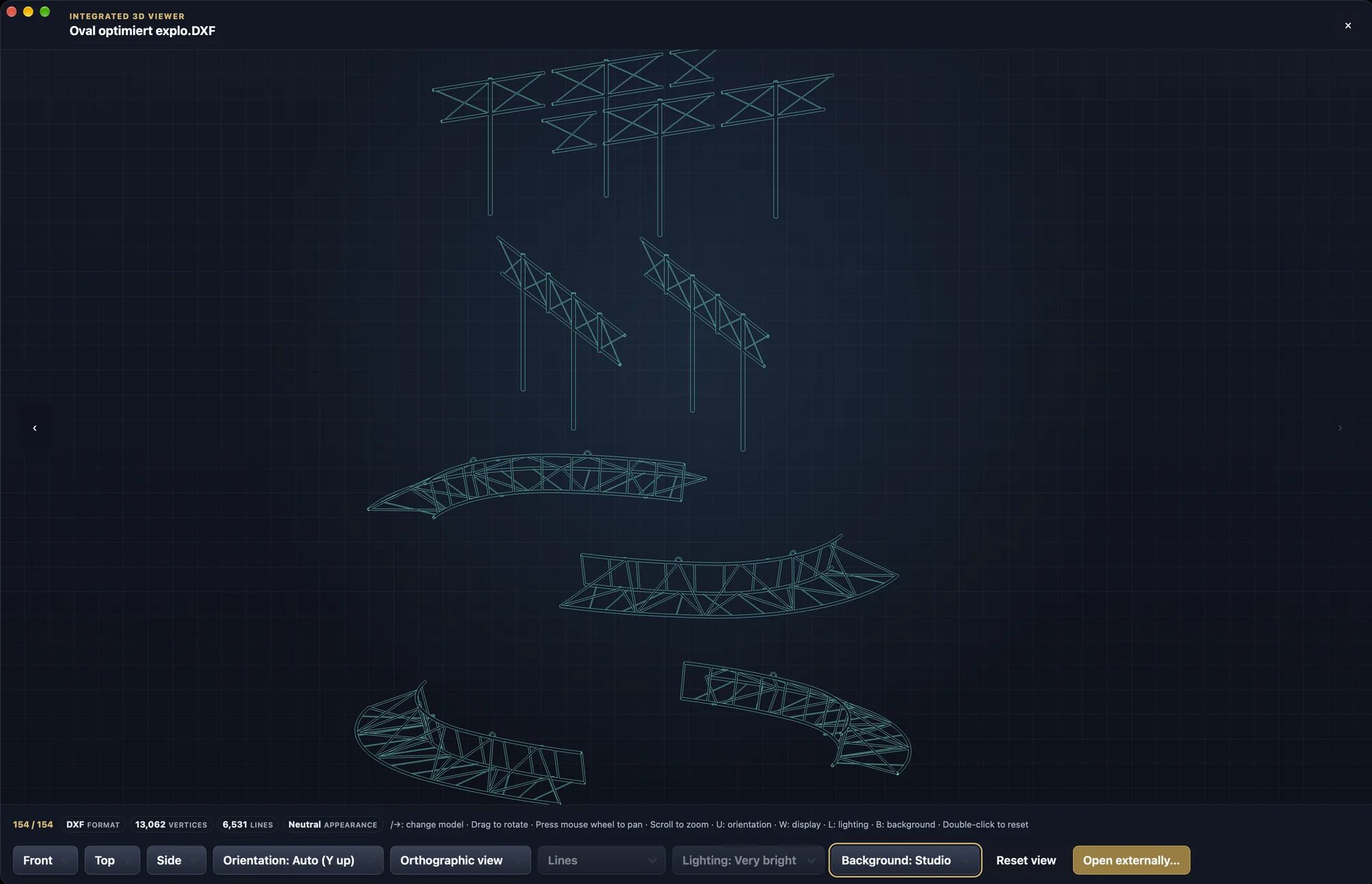
DWG and DXF plans open face on without perspective. Zoom goes deeper and stays under the pointer; older DWG drawings appear more completely.
DWG viewing is experimental. See the limitations →
Hide what gets in the way – Gatterie remembers the choice for each library. Hidden files stay unchanged in their folders.
PolishCropped copies without a light grey edge row.
See everything new →No new media library, no migration: Gatterie works directly with your existing folder structure.
Browse images, videos, documents and 3D models visually. Search, tags and stars help you keep track.
Local libraries, no telemetry and no account needed for the core features.
GATTERIE IN PICTURES
Visual file library for Mac
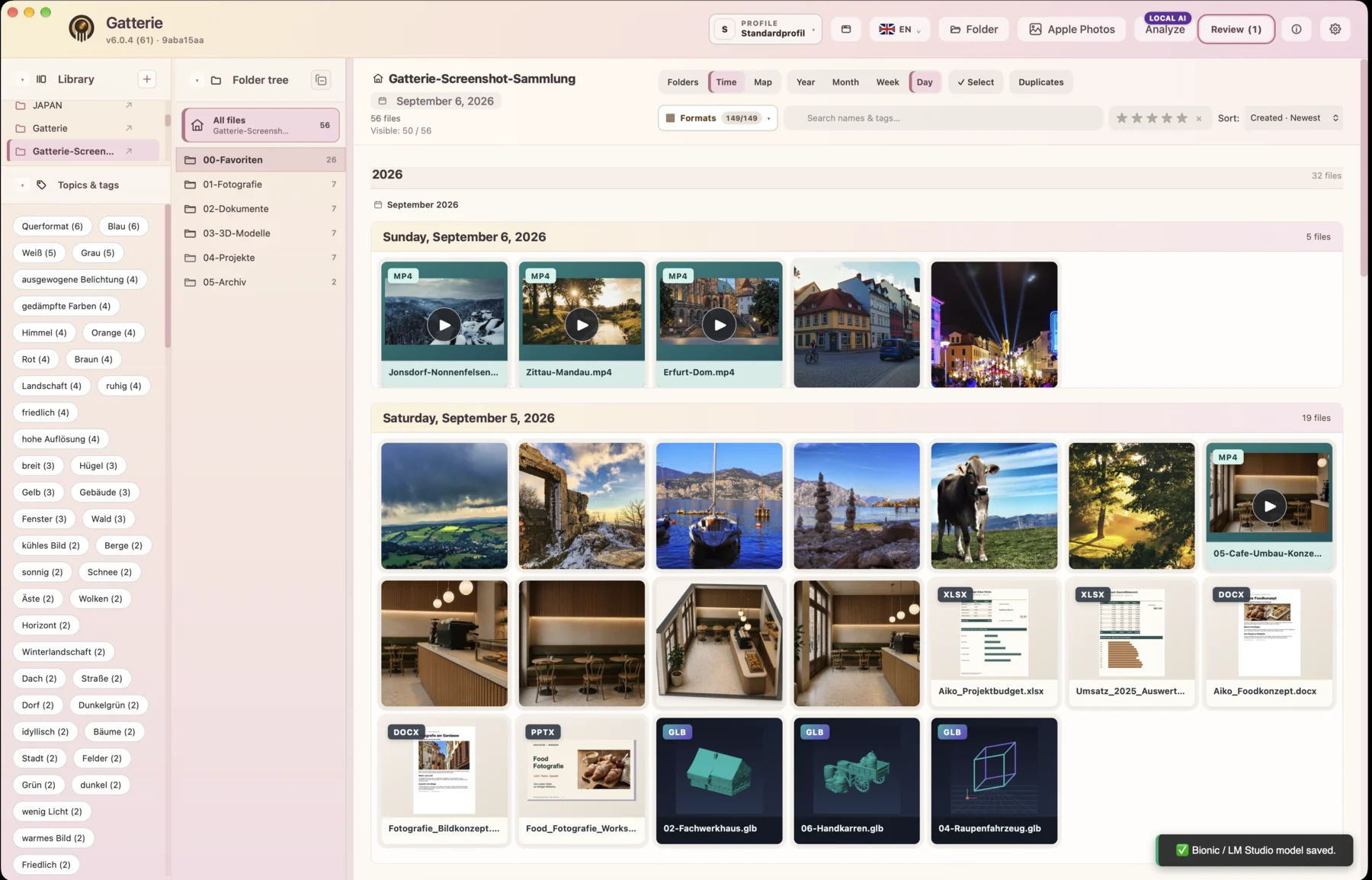
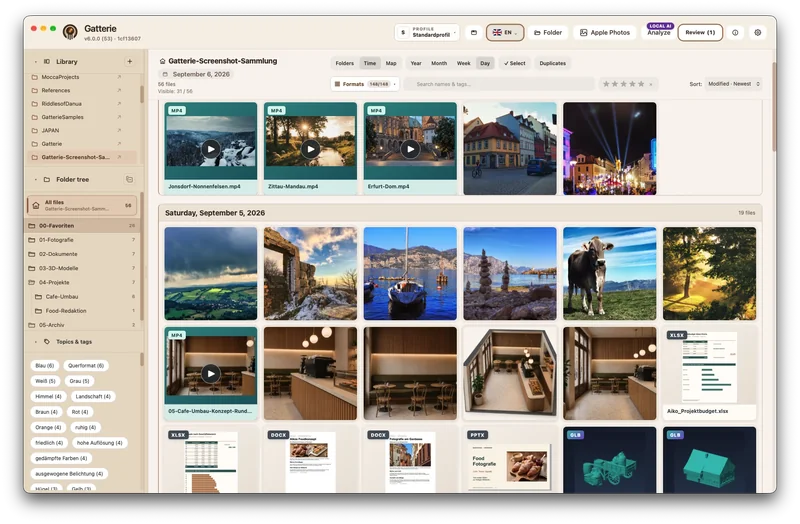
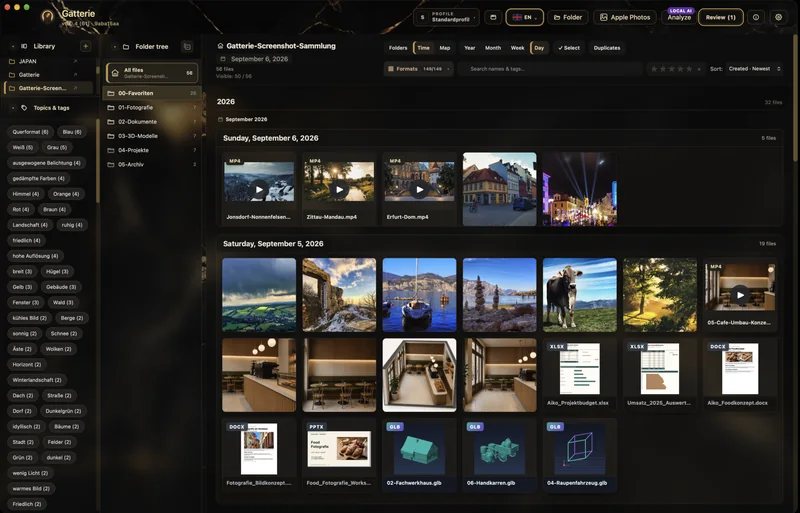
Photos, videos, documents and 3D models: Gatterie shows them straight from your folders, as a gallery, folder tree or timeline. Nothing is moved or imported into a library.
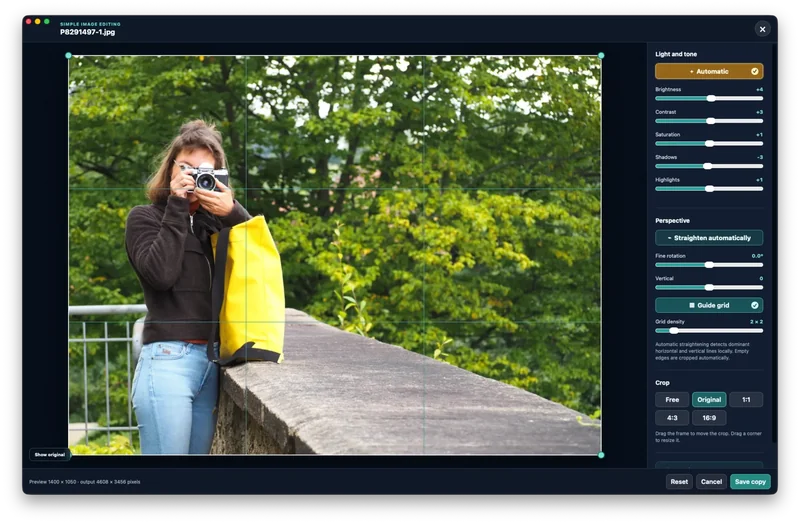
The built-in image editor
Adjust brightness, contrast and colour, straighten, crop. Gatterie saves the result as a new copy next to the original.
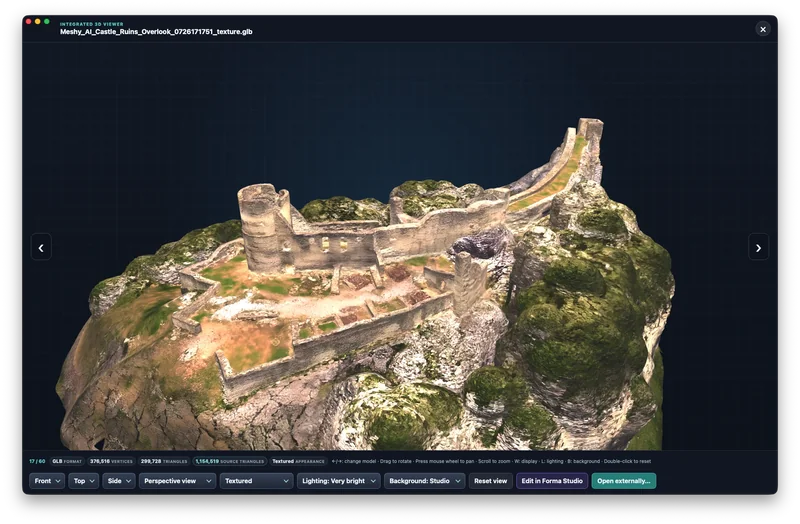
Integrated 3D viewer
Open models from your existing folders in the integrated 3D viewer, rotate them and zoom into details – without import.
Photos on the map
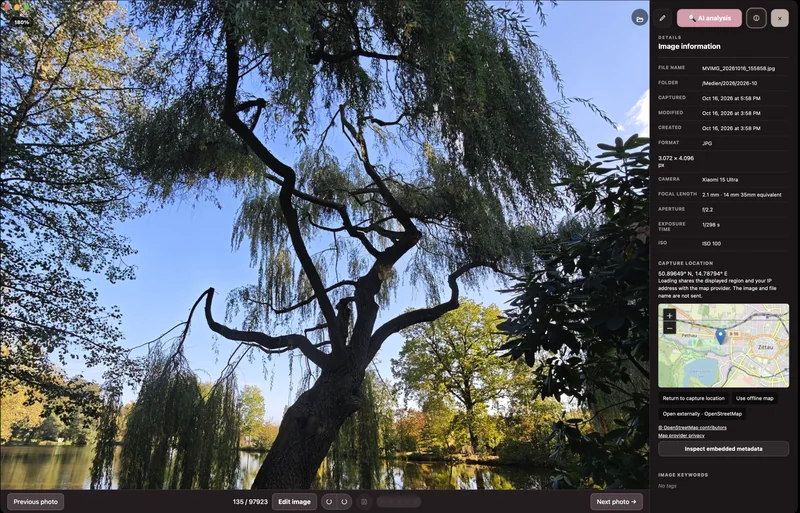
Gatterie reads the GPS data in your photos and shows where they were taken – grouped by place, with outings and tour lines.

Search · Tags · Stars
Search covers file names and tags, stars mark your best shots, and filters combine both. Every shot is quickly back at hand.
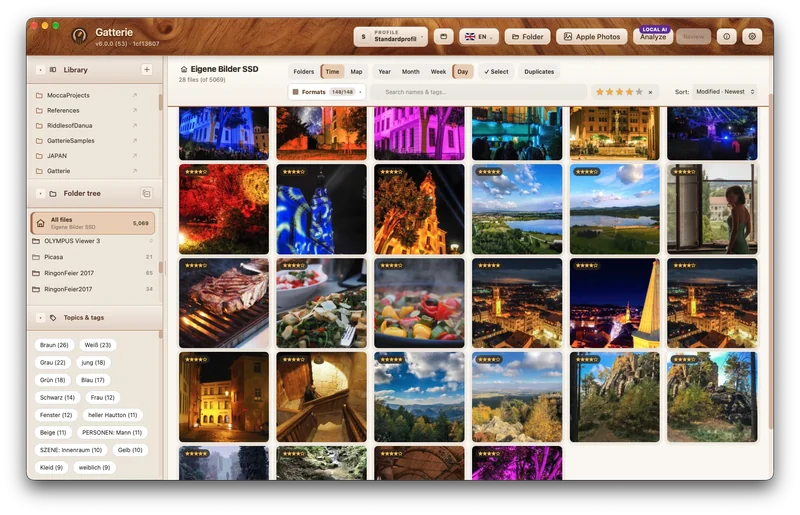
Image viewer
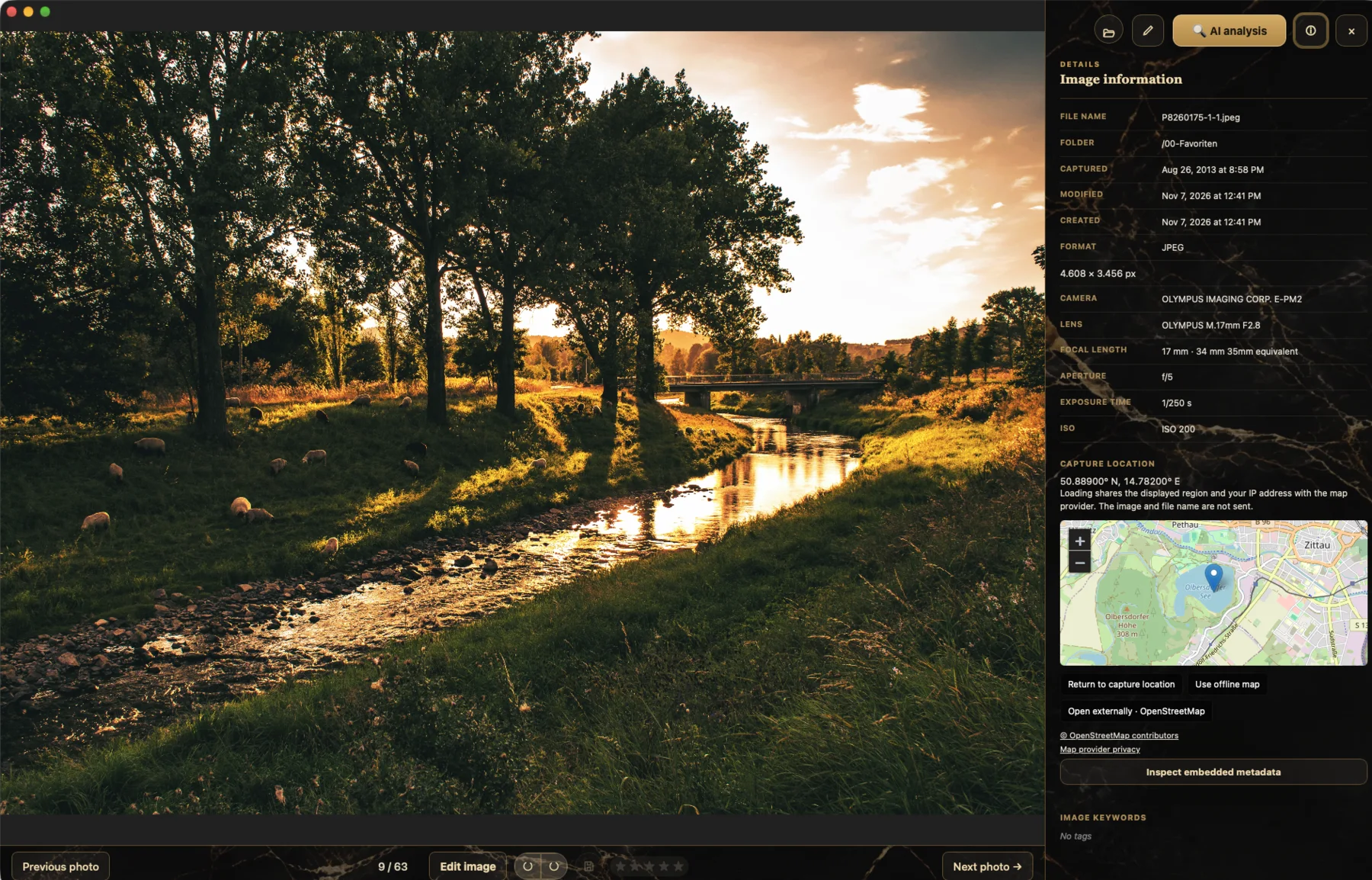
One click shows the picture large, alongside its camera data and, for GPS photos, the location on the map.
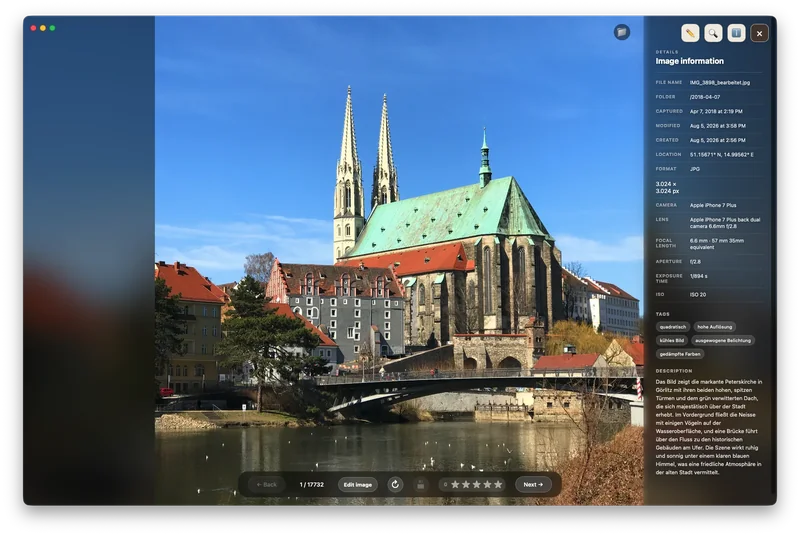
Local AI · EXIF, IPTC & XMP
An AI on your Mac suggests tags and image descriptions. You decide what Gatterie applies. By default, Gatterie writes EXIF, IPTC and XMP to a new image copy; only an explicitly selected expert option can change the original, after a warning.
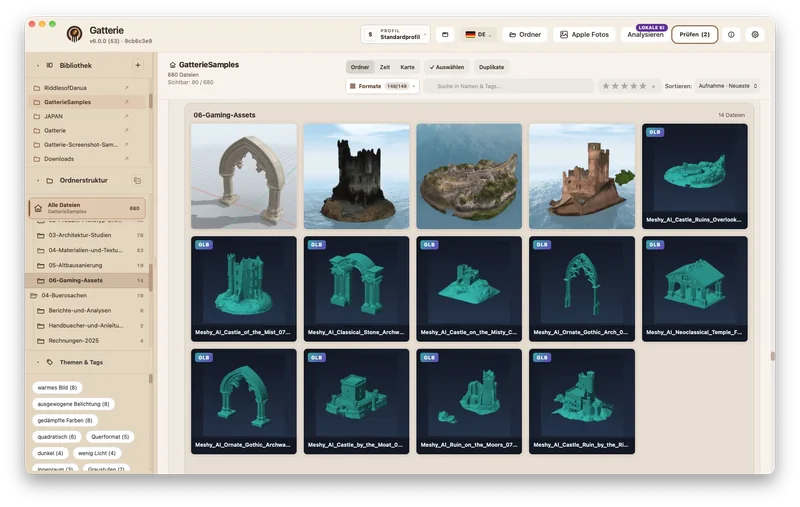
3D, CAD & documents
Gatterie shows previews of 3D, CAD and architecture files right in the library. One click opens the original in the right specialist app.
Light & dark themes · Local first
Light and dark themes, from Mocca to Marble · Black gold. Gatterie works offline, with no account and no cloud – your files stay on your Mac.


FOR EVERYONE WHO MISSES PICASA
Google discontinued Picasa in 2016. What many people loved about it is a core principle of Gatterie: your photos are shown straight from the folders on your drive – no import, no account, no cloud. Gatterie is not a clone but an independent visual file library.
See all featuresJust like before: choose folders and Gatterie shows what’s in them. Files are not moved or imported into a library.
Gallery, timeline, tags and stars to find files again; brightness, straightening and cropping for a quick fix in between.
RAW files, videos, PDFs and office documents, 3D models in the viewer and optional local AI for keywords and image descriptions.
VISUAL FILE LIBRARY · EVERYTHING IN VIEW
Gatterie combines photo gallery, image viewer and file browser in one app. Choose your folders and see your collection as a gallery, folder tree or timeline – with multiple libraries and separate profiles if you like. The visual overview helps you stay organised: find files with search, tags and star ratings without moving them.
See photos and videos by year, month, week or day, based on EXIF capture dates.
Search file names and tags, rate images with stars and find your favourites faster. The format filter hides file types you don’t need right now – remembered per library if you like.
Images with GPS data show where they were taken on a map. Gatterie only uses online map services if you choose to.
Gatterie recognises text in photos, scans and screenshots right on your Mac, with no upload.
Read camera data, keywords and descriptions; export reviewed metadata to new image copies.
Videos appear with a thumbnail among your photos and play right inside Gatterie.
LOCAL AI · TAGS, IMAGE DESCRIPTIONS, ALT TEXT
Get suggestions for keywords, image descriptions and copy from an AI model running on your Mac, with no upload to a cloud. Your photo collection becomes easier to search, and an image turns into text you can work with.
 Local image analysis
Tags and image descriptions make your pictures searchable.
Draft alt text, product copy and social captions.
Review and edit suggestions before accepting them.
With a compatible local model through Bionic, LM Studio or Ollama. Optional – Gatterie also works without AI.
PHOTOS ON THE MAP · OUTINGS & TOUR LINES
Gatterie reads the GPS data in your photos and shows where they were taken – grouped by place, straight from your folders. Click a group to open its photos alongside.
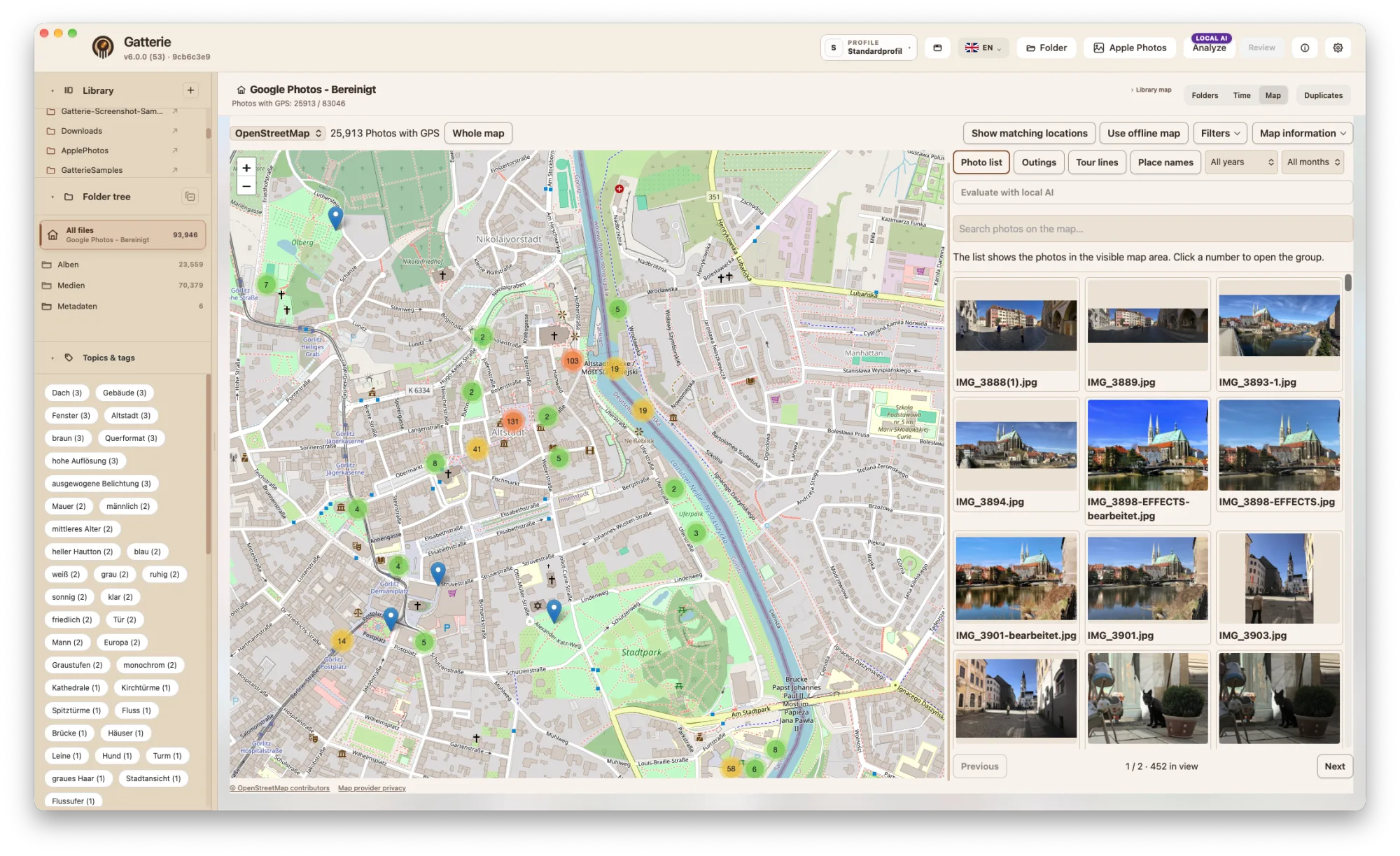
Lines connect the places of an outing in the order you took the photos – with start, end and direction arrows.
Year and month narrow down the map, lines and photo list, so you find that summer holiday in seconds.
Give favourite places your own names and find photos on the map through search. A photo group can also be evaluated with local AI.
The offline map works without a network. Gatterie only loads online maps such as OpenStreetMap when you choose them.
Photos need GPS data in their metadata to appear on the map. Tour lines connect photo locations and do not show the route travelled.
GATTERIE · INTEGRATED 3D & STL VIEWER
Many STL, OBJ, FBX, GLB or 3MF files with similar names? Gatterie shows models from your existing folders as thumbnails. Open a model in the integrated 3D viewer, rotate it and zoom into details – without import and before continuing in your slicer or CAD app. The 3D viewer is part of Gatterie, a visual file library with GPS photo maps.
One-time purchase · No subscription · Family Sharing · Requires a Mac with Apple silicon
Supported 3D & CAD formats ↓
See STL, OBJ, GLB and 3MF files as thumbnails without opening each file in your CAD app.
Change perspective and inspect shape, details, available colours and textures.
Your 3D files stay where they are: Gatterie does not move, rename or delete files.
Use Gatterie to inspect your models; handle print preparation and editing in your specialist app.
Rendering depends on the format and model. Unsupported variants remain accessible as format tiles.
DWG: experimental since App Store version 6.0.3. Drawings can be panned and zoomed as model-space linework. Not every DWG file can be opened; text, hatches and layouts are not displayed. DWG files are viewed, not edited. The free trial, Gatterie Trial 6.1.1, also includes this experimental DWG viewer.
New in 6.0.4: flat drawings such as DWG and DXF plans open face on without perspective. Mouse wheel zoom goes deeper and stays on the point under the pointer. Older DWG drawings are shown more completely.
THE BUILT-IN IMAGE EDITOR
For a small correction you do not need a second program: brightness, contrast, saturation, shadows and highlights, free rotation and automatic straightening, guide lines, and cropping with common aspect ratios — right inside Gatterie.
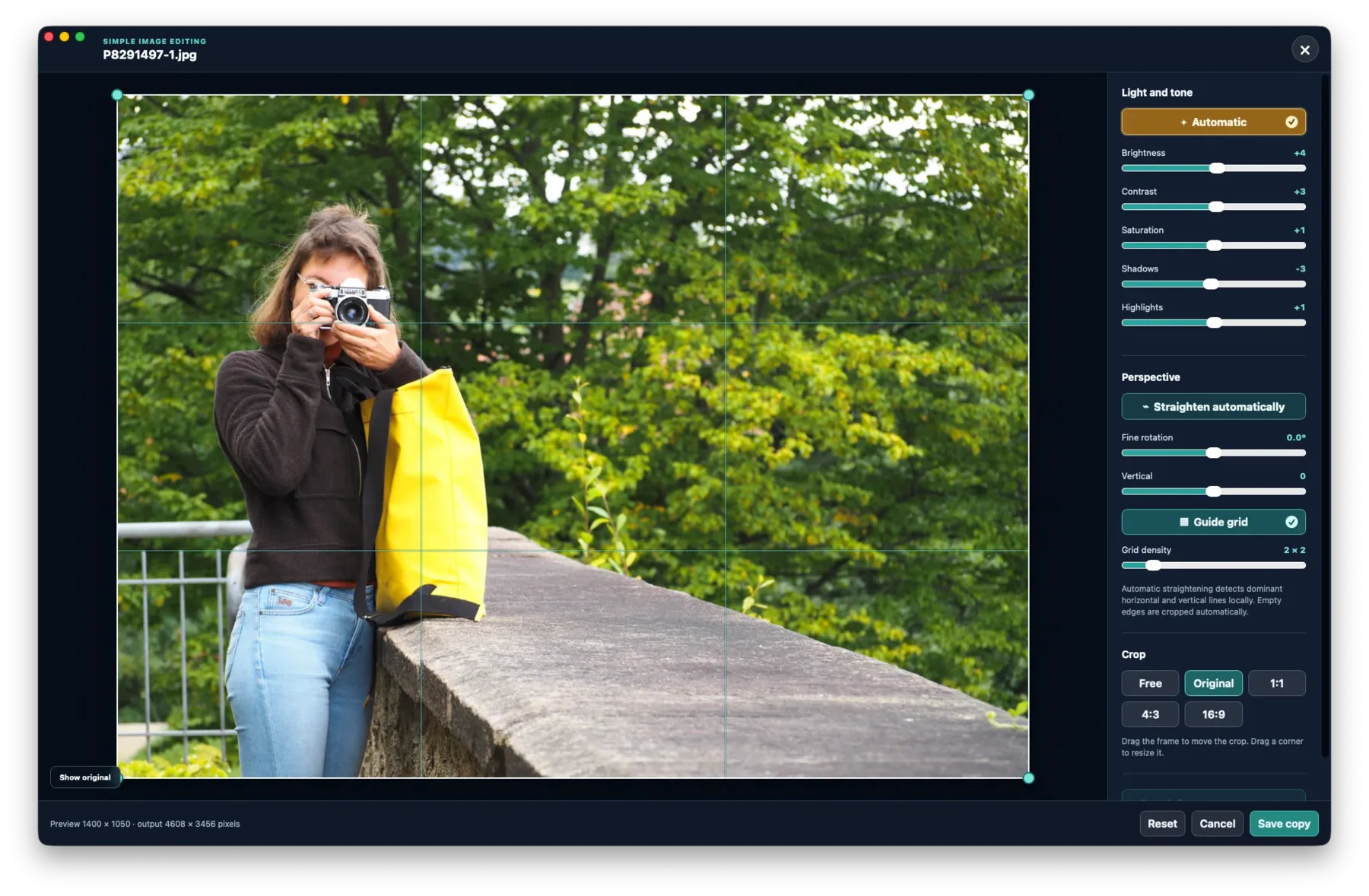
Adjust brightness, contrast, saturation, shadows and highlights.
Free rotation, vertical correction and automatic straightening.
With guide lines and common aspect ratios such as 4:3, 16:9 and 1:1.
By default, edited images are saved as a new copy. Only an explicitly selected expert option can change the original, after a warning.
LIGHT AND DARK THEMES. YOUR STYLE.
From Mocca to Marble · Black gold: light and dark themes with their own character. Dark themes turn the whole interface dark, including dialogs, menus and the gallery. Themes change the atmosphere while leaving your files and folders untouched.

Mocca · Default theme
IN PRACTICE · THREE COLLECTIONS IN GATTERIE
Whether it’s a photo archive, project folders with documents or 3D models: Gatterie shows your files right where they already are.
Local AI · EXIF, IPTC & XMP
An AI on your Mac suggests tags and image descriptions. You decide what Gatterie applies. By default, Gatterie writes EXIF, IPTC and XMP to a new image copy; only an explicitly selected expert option can change the original, after a warning.
AI, yes – but nothing goes into my photos unchecked.

* Fictional persona, AI-generated image
For food creators
Food photos, recipe PDFs and texts stay in your project folders. Gatterie displays them side by side, so you instantly see what belongs to each recipe.
A hundred shots per dish – and I instantly see which one belongs to which recipe.


* Fictional persona, AI-generated image
3D, CAD & documents
Gatterie shows previews of 3D, CAD and architecture files right in the library. One click opens the original in the right specialist app.
I want to find the right model without opening ten files in my CAD app.
* Fictional persona, AI-generated image
WHO GATTERIE IS FOR
Years of family and travel photos, RAW files (CR3, NEF, ARW, RAF, DNG and many more) and videos in one calm gallery – without importing them into a library.
STL, 3MF, OBJ and DXF files with thumbnails instead of cryptic file names – and rotate each model in the 3D viewer before it goes to the printer.
Browse a project’s PSD, AI and INDD files, PDFs, office documents and fonts (TTF, OTF, WOFF) together in one view.
Draft alt text, product copy and social media captions for your images with local AI – you review every suggestion before it is accepted.
Local first. Naturally.
Gatterie needs no cloud media library. Your libraries and previews stay on your Mac. You choose which folders to allow – and you can get started without AI.
Good to know
Some things deserve a closer look.
Here’s where to find them.
Choose the folder containing your STL files in Gatterie and open a model in the built-in STL viewer.
Open the folder in Gatterie and click the photo. Depending on the image:
Look around with mouse, trackpad or arrow keys. After a short pause the view turns on its own, and Esc leaves the panorama. Everything runs on your Mac, without uploading.
Photos, RAW, documents, videos, creative files, archives, fonts, source code, 3D and CAD. Depending on the format, Gatterie displays a local preview, macOS Quick Look or a safe format tile.
JPG · JPEG · PNG · GIF · WEBP
CR2 · CR3 · DNG · NEF · NRW · ARW · SR2 · SRF · RAF · ORF · RW2 · PEF · SRW · RAW
PDF · DOC · DOCX · XLS · XLSX · PPT · PPTX · ODT · ODS · ODP · PAGES · NUMBERS · KEY · RTF · TXT · MD · MARKDOWN · CSV · TSV · EPUB · HTML · HTM
MOV · MP4 · M4V · AVI · MKV · WEBM · MPG · MPEG · M2V · MTS · M2TS · 3GP · 3G2 · WMV · ASF · FLV · OGV · VOB · DIVX · QT
PSD · AI · INDD · IDML · XCF
ZIP · TAR · TGZ · GZ · BZ2 · XZ · 7Z · RAR
TTF · OTF · TTC · OTC · WOFF · WOFF2
CSS · SCSS · SASS · LESS · JS · MJS · CJS · TS · JSX · TSX · VUE · SVELTE · PY · RS · SWIFT · C · H · CC · CPP · CXX · HPP · HXX · M · MM · GO · JAVA · KT · KTS · CS · PHP · RB · LUA · SQL · GRAPHQL · GQL · JSON · JSONC · YAML · YML · TOML · XML · PLIST · GDL · Dockerfile · Makefile · CMakeLists.txt
GLB · GLTF · FBX · OBJ · STL · USD · USDA · USDC · USDZ · DAE · PLY · 3DS · BLEND · C4D · PLN · PLA · GSM · DXF · DWG · 3MF
Quick Look previews depend on macOS and installed apps. Unknown, executable and hidden files are not added to the gallery.
The format list covers gallery recognition and previews. A tile does not establish interactive model viewing. DWG is experimental; see the DWG limitations.
For many people, yes. Like Picasa, Gatterie works directly with the folders on your computer – without import or account.
According to IrfanView's own FAQ (as of October 2026), there is no native Mac version; it describes workarounds using Windows compatibility tools.
If you are looking for an image viewer for your folders on the Mac, you can try Gatterie:
Normally, your originals stay unchanged.
Exception: Only an explicitly selected expert option can change the original after a warning.
No. File management, search, 3D and the image editor work without additional AI.
With Gatterie Trial, you can try the app for 14 days for free on your own folders.
Switching to the full version: a one-time purchase on the Mac App Store, no license key. Simply open the same folders in the App Store version – your star ratings, tags and exported image copies stay in place. Afterwards, you can move Gatterie Trial from Applications to the Trash; nothing changes in your folders.
Download Gatterie Trial 6.1.1 (DMG · 24 MB)
Requires a Mac with Apple silicon (M1 or newer) and macOS 12 or later · Notarized by Apple (Developer ID: Jan Fallgatter) · SHA-256: 6a8913ce6f31ea00cc524527ec78d3df622a250fe94ec08f078c243c63669794
Buy once, no subscription. Gatterie 6 is available on the Mac App Store; you’ll find the current price for your country there.
Probably not if you only manage or browse photos. Free programs usually do that well enough – Gatterie would then be more than you need.
Gatterie is worth it when the same folders hold more than images:
Searching that collection in one view, seeing previews and rotating models directly is the difference. Add the built-in image editor and local AI – both without an account, without a cloud and without monthly costs.
Gatterie is a one-time purchase. Whether it is worth the price depends on what is in your folders.
The first public App Store release is planned for Mac. A public mobile release is planned only after a stable Mac launch and full mobile acceptance testing.
Go to the iPhone & iPad betaNow on the Mac App Store
Gatterie 6 is now available on the Mac App Store.
See the current price for your country in the Mac App Store.
No registration · Stars & tags carry over when switching · SHA-256 & details ↑
Buy once – no account with us, no subscription.
Gatterie shows what’s inside – nothing is imported.
Search, rate and explore on the map – offline on your Mac.
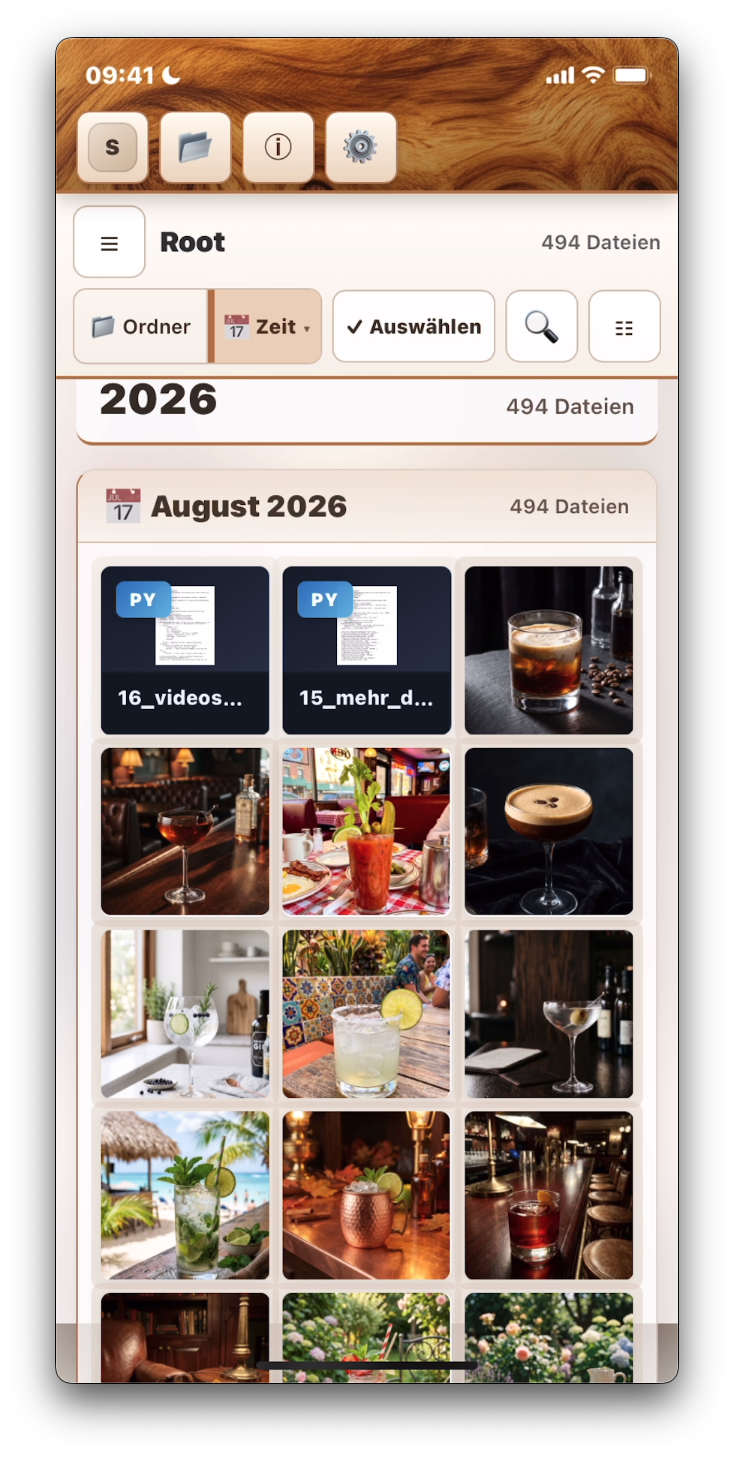
Gatterie on the go
As a separate experimental Mobile Beta. Features may differ from the Mac version.
Open the Mobile Beta in TestFlightFor the smoothest setup, open the link directly on your iPhone or iPad.